The following is a guide to installing and updating the Theme62 blogger template.
Install
How to install a template on a blog :
Use this method if it's your first time installing a Theme62 template
- Set the required template settings in Dashboard Template
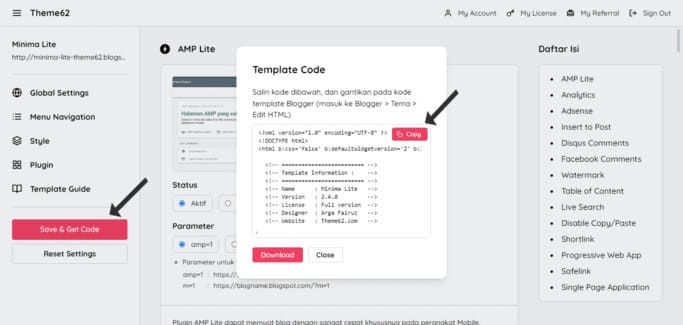
- Click Save & Get Code
-
Copy the code of the template that appears
![Copy the code of the template that appears]()
-
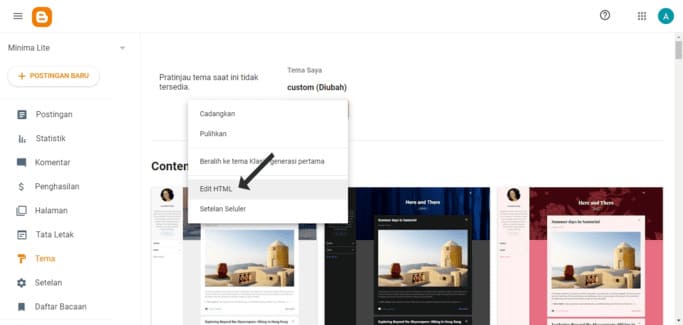
Go to Blogger.com -> Theme -> Edit HTML
![Go to Blogger.com -> Theme -> Edit HTML]()
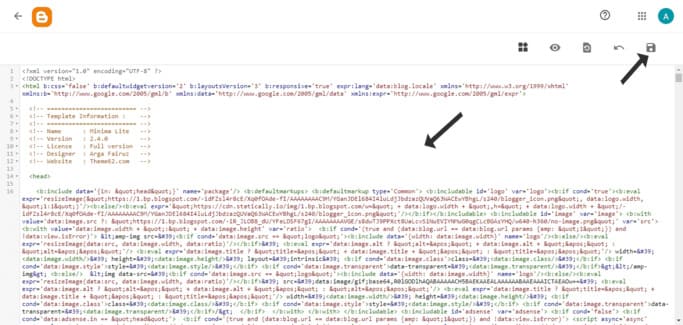
- Clear all the code, and paste the template code
-
Click Save
![Click Save]()
Update
How to update the template on the blog :
Use this method if you want to update Theme62 template
If a problem occurs, please use the "Install" method
- Set the required template settings in Dashboard Template
- Click Save & Get Code
-
Click Download
![Click Download]()
-
Go to Blogger.com -> Theme -> Restore -> Upload
![Go to Blogger.com -> Theme -> Restore -> Upload]()
-
Select the downloaded file
![Select the downloaded file]()
- Then the template update process will take place.


